How I Built a Custom CRM with Vibe Coding

I'm an economist, not a programmer. My company, Specraz (спецраз.рф), arranges special permits for oversize and overweight cargo. Since May 2026, I have been building an order management system for it with the AI agents Claude Code and Codex—SUZ (our order management system). Six operators use it now. Here is how it happened, without sugarcoating.
I Tried Off-the-Shelf CRMs
First came Trello, then amoCRM. In the end, we went back to Telegram and Google Sheets.
An order for a special permit is not a “deal” in a sales pipeline. It has five different parts:
- the brief — where it starts, where it ends, what we are moving, and the dimensions and axle loads;
- route planning in the government Safe-Route system, usually with several options;
- documents — permits, government fees, and invoices;
- client communication in Telegram, MAX (a Russian messenger), WhatsApp, and email;
- payments.
An off-the-shelf CRM understands deals and contacts, but not routes, a tractor-trailer combination, or permits. So this was our setup: a bot created a Telegram topic and a row in a Google Sheet for each order. The order register and project register were two manually maintained sheets. We copied application and route data by hand too.
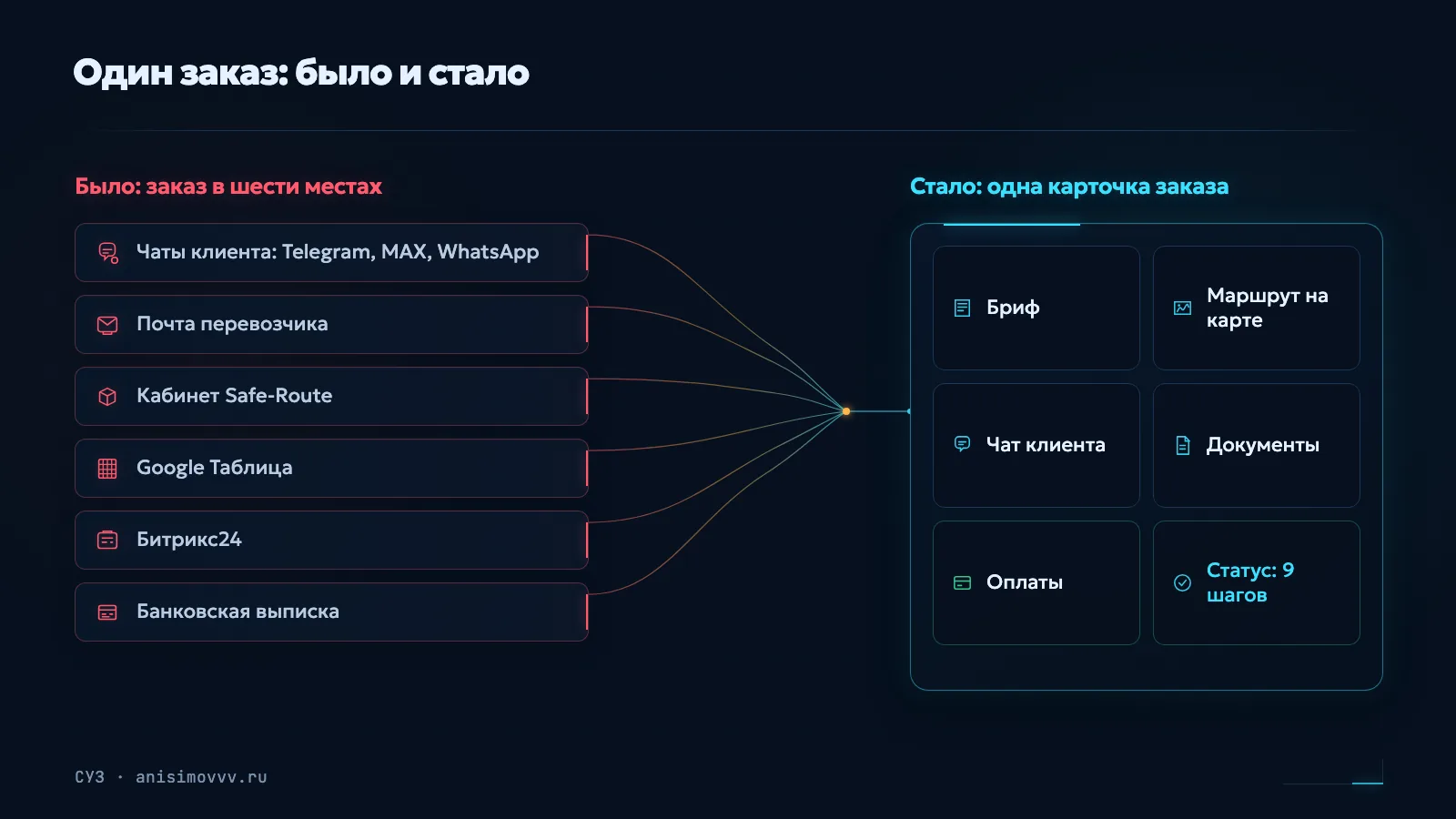
I did not need another pipeline CRM. I needed a clear list of all orders with client communication right beside it. That is what I decided to build.
What I Built
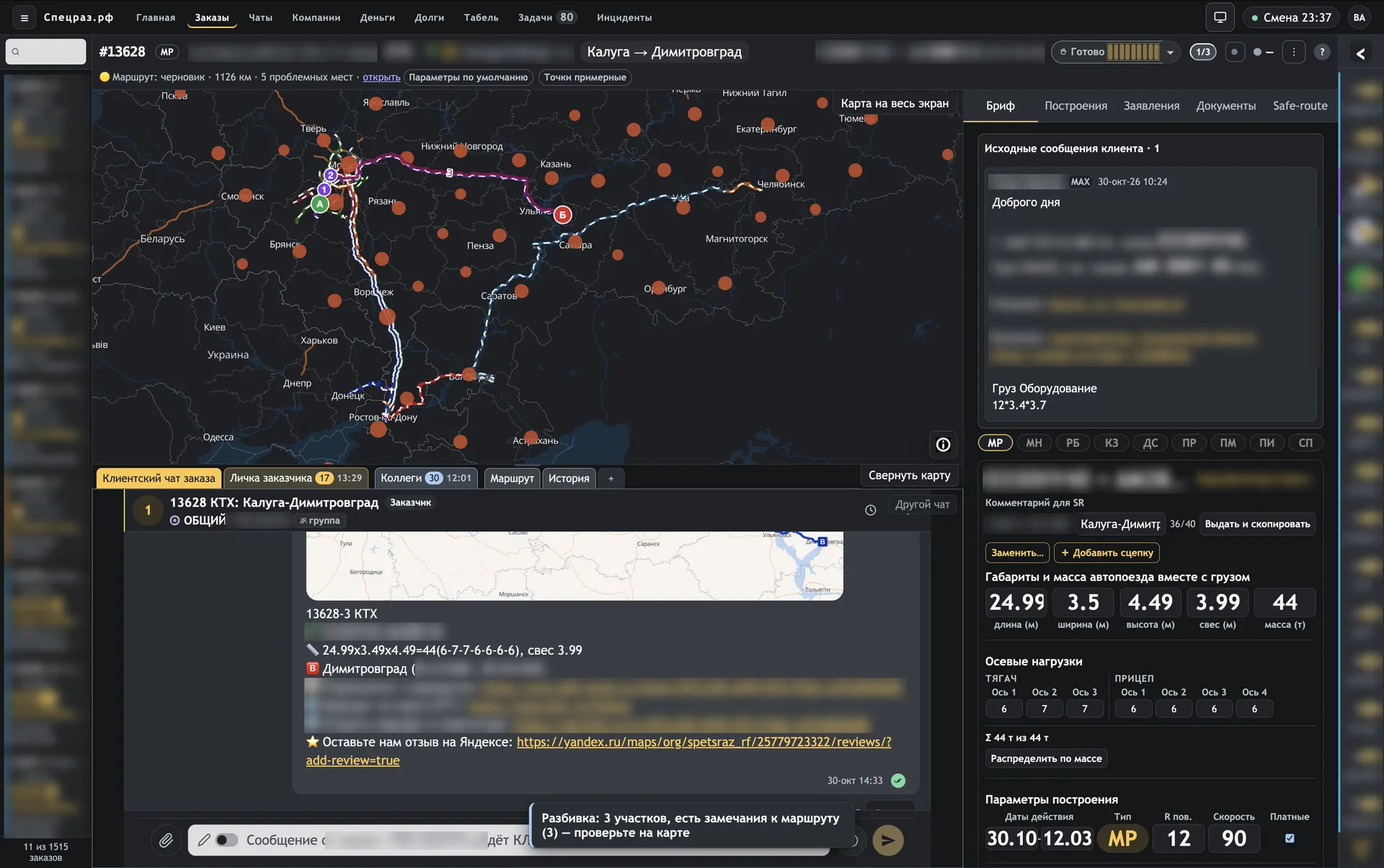
The main screen is an order card. The route map is on the left, the client chat is in the center, and the brief and dimensions are on the right. The operator does not need to switch between windows.
- All orders in one list. Filters, statuses, and the next step are visible for every order.
- The brief saves field by field. If two operators edit the same order, the system will not let one erase the other's changes.
- Route options in a strip with a preview on the map. A “What We Already Know” panel pulls up past permits and route plans for the same direction.
- Documents go to the client only after a review.
- Money. A robot checks incoming bank payments and suggests which order a payment belongs to. A separate screen reconciles invoices and payments for each order.
- A readiness checklist and a nine-step order status, with a prompt for what to do next.
At the end of October, SUZ got two assistant bots:
- Administrator sends the team a summary of all open orders five times a day—at 8:00 a.m., noon, 3:00 p.m., 7:00 p.m., and midnight Moscow time.
- Guard makes sure no client waits for a reply. Fifteen minutes of silence means a reminder in the order topic; 30 minutes means an alert.
How I Built It
- Late 2025. The first attempt, of course, started with the frontend. I spent several days drawing the order strip in Figma.
- May 2026. I got seriously started on SUZ.
- July 2. First screen: the order list and the order card itself.
- July 3. Team sign-in, a link to a particular order, the map, and the brief.
- July 4–9. The “All Orders” register, orders inside the Omni messenger, and client cards.
- By July 20, operators were already working in SUZ—less than three weeks after the first screen.
- July 26. A complete workspace: route plans, the brief, and the order in one right-side panel.
- August 10–12. The “Route Plans” tab: route options in a strip and sending route plans to Safe-Route directly from the order.
- September 12. One-button releases, with a log.
- September 21. I redesigned the “Route Plans” tab in 2 hours 43 minutes—from the first request to use by operators.
- October 23–30. Administrator and Guard.
There was no big release day. The system grows like a progressive JPEG: first a rough but working image, then the details.
How I Work With AI Agents
I do not write code. My job is to explain what hurts and check that it got better.
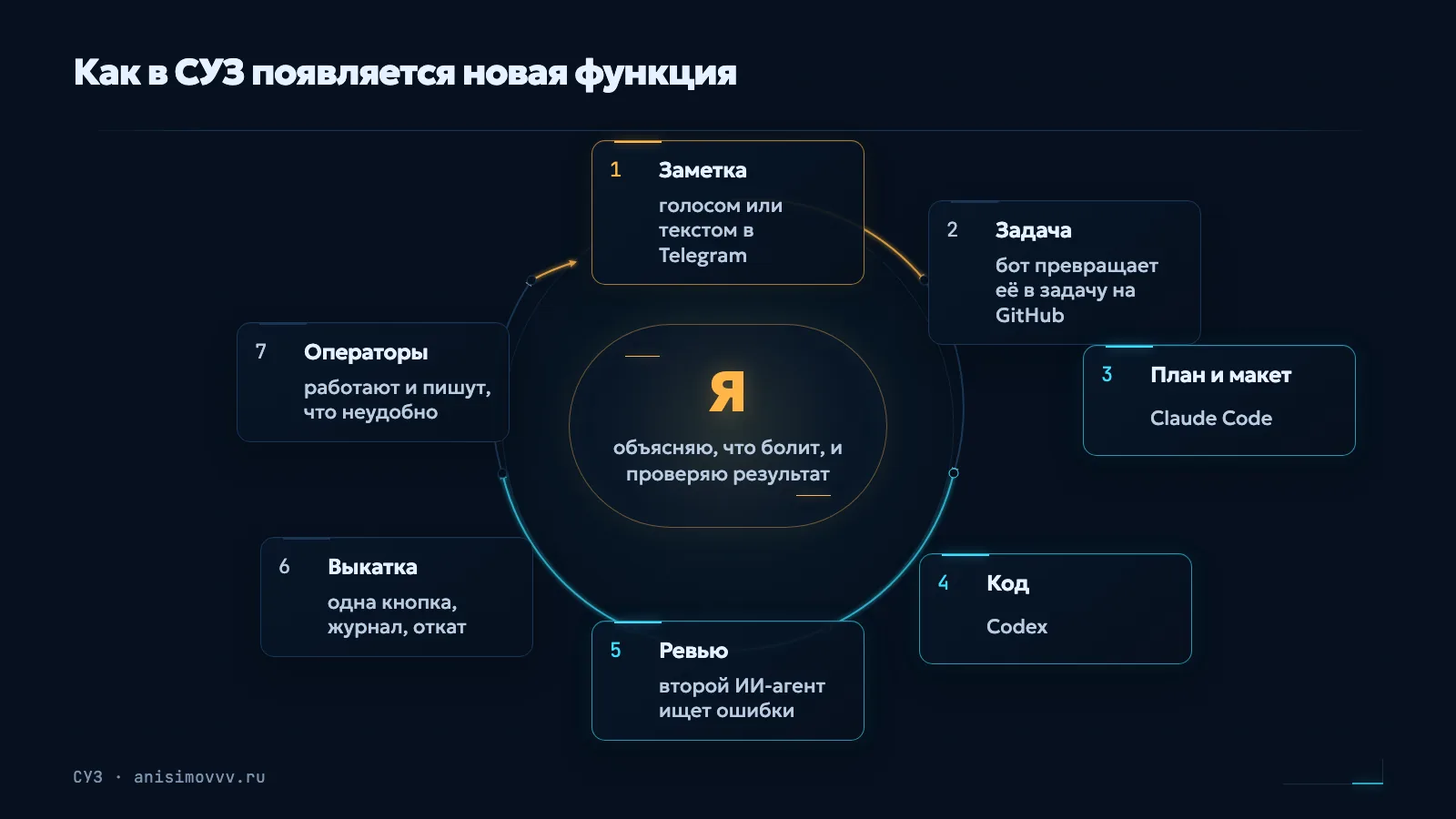
- A note. Voice or text in Telegram when something is inconvenient for me or the operators.
- A task. A bot turns the note into a task on GitHub.
- Plan and mockup. Claude Code works through the task and writes a plan. If a screen changes, we draw a mockup first. There are 38 for SUZ alone, and I reviewed each one before the code was written.
- The code is written by Codex.
- Review. A second AI agent checks each change and looks for errors. No more than three review rounds, or you can polish forever.
- Release is one button with a log. If something breaks, the same button rolls it back.
- Operators use it and tell us what is inconvenient. The loop closes.
Since September, tasks have been divided into three tracks based on risk. AI handles and releases the small things on its own. Anything involving money, writing to a government system, or irreversible actions waits for my “go ahead.”
What Went Wrong
A pretty Figma mockup. I started, of course, with the frontend. I happily spent several days drawing what the order strip should look like in Figma. That design stayed in Figma. The real interface grew out of the database structure and relationships between pages. Lesson: decide what gets stored and how it connects first; the screen comes later.
A window that was too strict. We made an “Add Vehicle” window to register a client's vehicle in the government system. The review found a lot of mistakes, and we fixed them in three rounds. Registering it in the government system eventually worked. But I myself could not get through the checks in that window—there were too many. Since then, the rule is to build the working core first, then add checks for real pain. New usability checks are warnings, not blocks. Only security, data integrity, and protection against duplicates remain blocking.
A duplicate application. After a successful pilot of the “Start Route Planning” button, the review found a gap: if you reload the page and press it again, the application can go to the government system a second time. We moved that risk into a separate task. Lesson: everything that writes to an external system must be protected from a double click.
A white screen. After one of the workspace updates, SUZ opened to a white screen. We disabled the new part and rebuilt the interface. Lesson: rollback needs to be simple. A month and a half later, a release button with rollback appeared.
And what got better. I judge by myself. Before, the full order setup—from the client's first message through payment of the government fee—could take me an hour. I had to create a Telegram topic and a spreadsheet row, re-enter the application and route data, find the payment in a bank statement, and figure out where the order stood. Now the same thing takes 15–20 minutes. The brief is assembled from the conversation, route options sit in a strip right on the order, the robot tells me whose payment it is, and the status shows the next step.
The Numbers
- 6 operators use SUZ.
- Less than 3 weeks from the first screen to operator use.
- Up to an hour → 15–20 minutes to set up an order end to end: from the client message to government-fee payment.
- ≈ 1,400 commits in the SUZ codebase, ≈ 90 accepted pull requests.
- More than 100,000 lines of code.
- 38 screen mockups—before the code was written.
- 2 h 43 min—the fastest redesign: from request to production.
What It Cost
- AI subscriptions — $436 a month including tax. I have not been able to bring it any lower.
- Two servers — about 7,000 rubles a month. One of them, for the map and SUZ, is quite powerful.
- My time — I have not counted the exact hours. In practice, almost my entire day is now vibe coding, with breaks for operational work, food, and a walk.
Could You Do This in Your Business?

If you have already tried vibe coding yourself and hit a wall—architecture, deployment, or AI breaking things that work—message me. I will tell you how we could build something like this for you.