
AI Agents for Business: What Works for Me and Where Humans Are Still Needed
I am an economist, not a programmer. My company, Specraz (спецраз.рф), arranges special permits for oversize and overweight cargo. Since the summer of 2025, I have been building our own software with the help of Claude Code and Codex AI agents. Those agents now work inside the business too: they reconcile orders, watch for unanswered customer messages, and flag payments.
Below is what the agents I use today actually do on their own, and where a human is still essential. This is not a market overview—only what I see in my own business.
What I Mean by an AI Agent
A chatbot responds when you ask it something. An agent triggers itself on a schedule or in response to an event, looks at data, and does something: sends a message, creates a task, or suggests an option.
This definition is enough for me: an agent is a program that notices when it is time to act and acts within the boundaries I set. Everything else is detail.
The Agents I Use
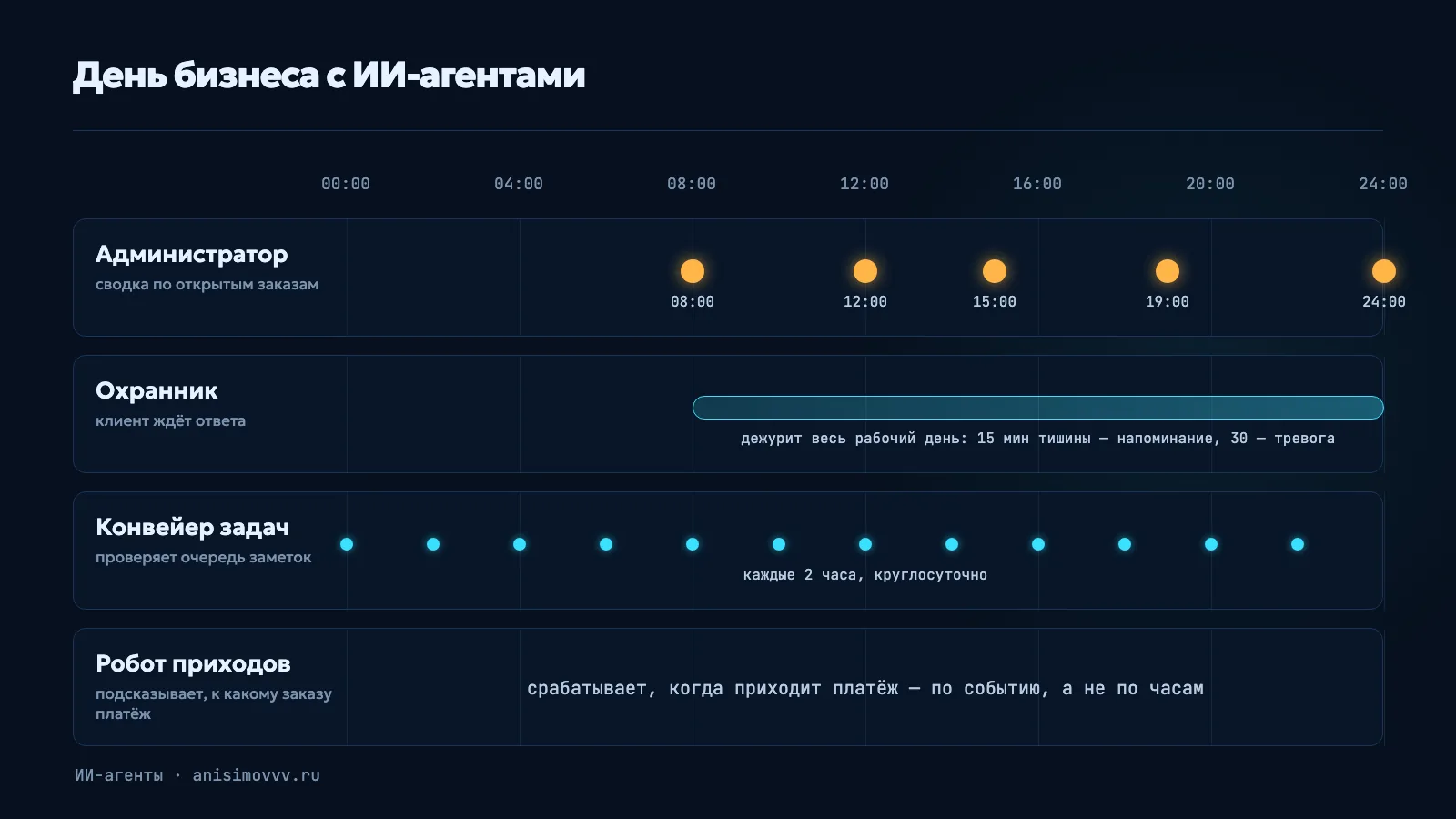
Administrator: Order Summary
It runs in SUZ (our order management system). Five times a day—at 8:00 a.m., noon, 3:00 p.m., 7:00 p.m., and midnight Moscow time—it sends the team a summary of every open order in our work chat.
I used to build that picture by hand: open the spreadsheet, go through the orders, and work out what was urgent. It took several hours a day. You open an order, find an urgent task inside it, and start doing it.
Guard: Customers Should Not Have to Wait
It watches customer conversations. If a customer has not received a reply within 15 minutes, it posts a reminder in the order thread. After 30 minutes, it raises an alert. The code counts only business hours, from 8:00 a.m. to midnight Moscow time.
It is the simplest agent in concept and the most useful in practice. It is not smart; it just does not fall asleep. So far, there has not been a case where its alert saved an order.
Read more about the Administrator, the Guard, and the system they live in in the SUZ case study.
Bank Receipts Bot: Suggests Which Order a Payment Belongs To
SUZ has a register of incoming bank payments. The bot looks at what arrived in the account and suggests which order the payment belongs to. A person makes the final decision: assigning money to orders is a separate action in the system and requires confirmation.
AI in Customer Conversations: Voice Messages and the Brief
In Omni—my messenger where managers reply to customers in Telegram, MAX (a Russian messenger), WhatsApp, and email—AI transcribes voice messages and builds an order brief from the conversation: origin, destination, and cargo. The brief becomes an order in SUZ. A manager checks and edits it.
Recruiter: Candidate Funnel and Questions
The recruiting bot leads a candidate through questions, filters out people who do not meet key requirements, and politely declines them. Its AI answers candidate questions from a knowledge base and clearly warns that this is not an offer. The bot sends a suitable candidate's card to my private group, and I make the decision: consider or decline.
Intake Desk and Pipeline: Agents That Write Code
My most unusual agent is not in the business itself but in development. When something is inconvenient for me or the operators, I record a voice note or write it in Telegram. A bot turns it into a GitHub task. Then the pipeline takes over:
- An AI agent analyzes the task and assigns it to one of several tracks based on risk.
- Another agent writes the code.
- A third checks every change and looks for errors. There are no more than three review rounds; otherwise, you can polish something forever.
- Deployment is a single button with a log, and rollback uses the same button.
The note queue is processed every two hours, around the clock. The agent handles and deploys small changes on its own. The pipeline has already handled more than 100 tasks.
Where an Agent Cannot Act Without a Human
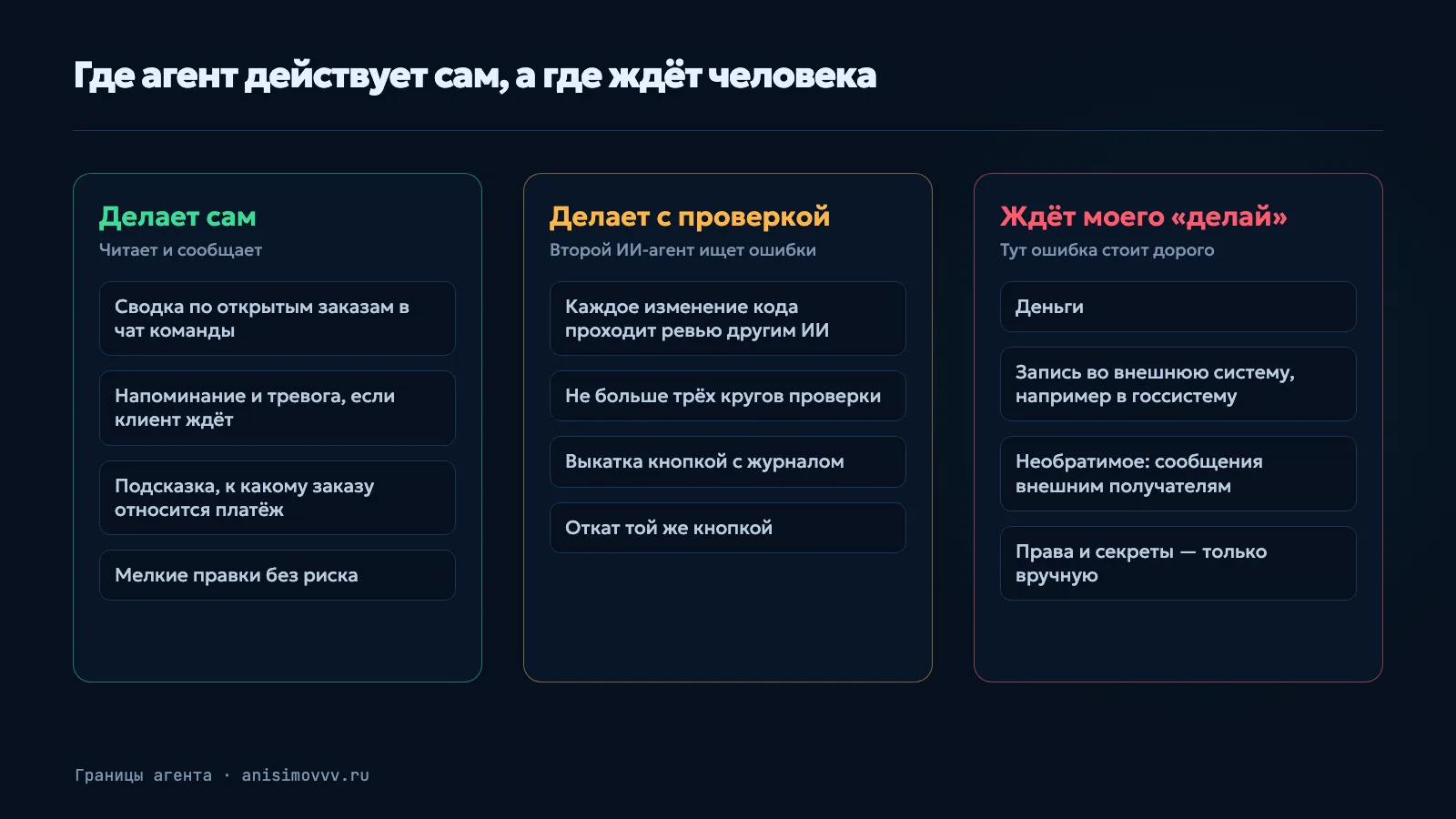
I have a simple rule. An agent can read, report, and suggest. But there are four areas where it does not act without me:
- Money. Nothing that moves money or changes a payment status.
- Writing to an external system. For example, the government system where permits are issued. You cannot undo a mistake there with a button.
- Irreversible actions. Messages to external recipients: customers and partners. You cannot take back a sent message.
- Permissions and secrets. Who can do what, and where keys are stored—manual changes only.
For these tasks, the agent prepares reconnaissance: what should change and where, and how risky it is. Then it waits for one word from me: “do it.” Not an “OK” somewhere between the lines, but those exact words in a separate message.
This is not distrust of AI. It is ordinary management logic: the more expensive the mistake, the closer a person needs to be to it.
What Went Wrong
An overly strict screen. We built an “Add Vehicle” screen to register a customer's vehicle in the government system. The review found a lot of errors, and we fixed them in three rounds. Registering the vehicle in the government system did work in the end. But I myself could not get through all the checks on that screen—there were too many. Since then, the rule has been: first, build a core that works; then add checks for real pain points. New usability checks are warnings, not blocks. Only security, data integrity, and duplicate prevention remain hard blocks.
A duplicate application. After a successful pilot of the “Start Route Planning” button, the review found a hole: if you reload the page and click it again, the application may be sent to the government system a second time. We moved the risk into a separate task. The lesson: anything that writes to an external system must be protected against a double click. That is why an agent waits for a human there.
A white screen. After one update, the SUZ workspace opened as a white screen. We turned off the new part and rebuilt the interface. The lesson: rollback must be simple. A deployment button with rollback appeared a month and a half later.
What It Costs
- AI subscriptions — $436 a month, including tax.
- Two servers — about 7,000 rubles a month. One is fairly powerful: it runs the map and SUZ.
- My time — I have not counted the exact hours. Almost all of my day is now spent working with agents, with breaks for operations.
There is no separate fee for the agent “employees” themselves: they run on the same servers. AI inside the products—voice transcription and brief creation—is paid for separately through OpenRouter. It is a small amount.
Where You Can Start
Three steps from my own experience:
- Start with an observer, not an executor. My first two agents do not change anything in orders. They only watch and report: a summary and a reminder. That is safe, and the benefit is immediately visible.
- Find a gap where people simply forget. They do not reply in time, or do not notice that an order is stuck. An agent works well where the need is not intelligence but consistency.
- Decide in advance what the agent is not allowed to do. Money, external systems, and irreversible actions should default to “only after I say so.” You can expand from there later, based on results.
And one more thing: do not try to build everything at once. My system grows like a progressive JPEG: first a rough but working picture, then the details.
Could This Work for You Too?

If you have already tried vibe coding yourself and hit a wall—with architecture, deployment, or AI breaking something that already works—get in touch. I can explain how we could build something like this for you.